
Share
Share
Share
Share
Choosing a domain is often treated as a quick search. In practice, it involves more than finding a name with a green “available” label.
You may need to compare several extensions, inspect ownership information, check registrar prices, and estimate the cost after the first year. I tested Check Domain to see whether it could bring these steps into one research process.
This review focuses on how the tool works, where it helps, and where users should still verify information independently.
A basic domain checker usually answers one question: is a specific address available right now?
That answer is useful, but incomplete. A brand name may be available on .net but already registered on .com. A first-year promotion may look cheap, while the renewal price is much higher. A registered domain may also have a public record that gives useful context about its registrar, nameservers, and important dates.
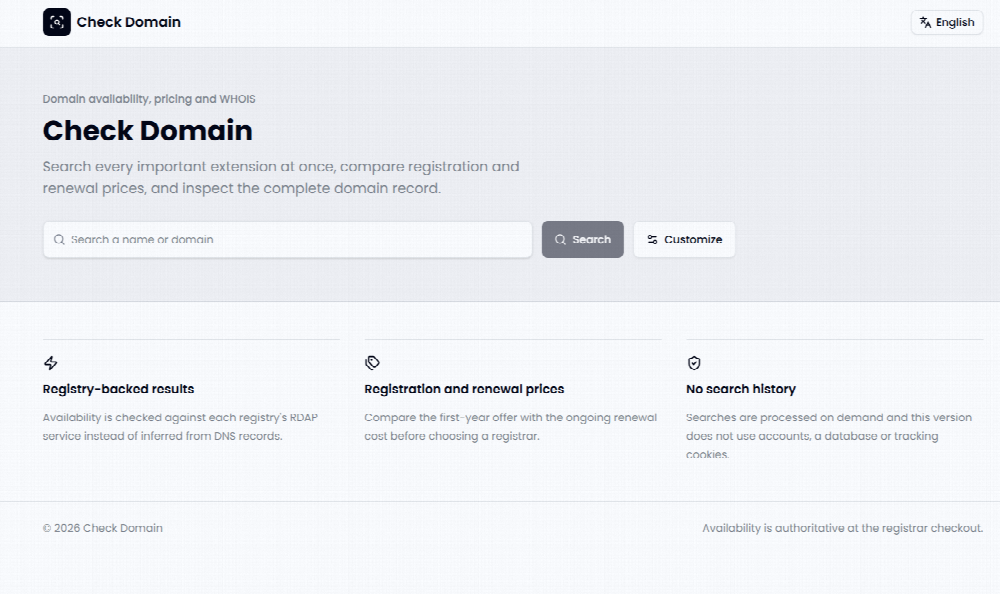
This is where Check Domain takes a broader approach. It combines domain availability, extension information, WHOIS or RDAP data, and registration and renewal prices in one interface.
The Test Case
For a simple test, I used a fictional brand idea and searched several common extensions. I wanted to compare the same word across .com, .net, .org, .io, .ai, and other available options.
The first useful detail was that the search could begin with either a brand keyword or a complete domain. This makes the tool suitable for early naming research as well as checking a specific address before registration.
Multiple Extensions in One Pass
Instead of checking each extension separately, I selected a group of domain endings and reviewed the results together.
This is helpful when the brand name is not yet fixed. It allows a user to see whether the name is available on familiar extensions, technology-focused endings, or newer domain categories.
The results are not limited to a simple available or unavailable label. The page separates availability, registered status, for-sale status, and cases that may need further confirmation. That distinction matters because a registered domain is not always permanently out of reach, but it may involve a different purchase process.
Registry-Backed Availability Checks
One technical detail stood out during the review. Check Domain says it checks availability through registry RDAP services instead of relying only on DNS records.
This is important because DNS and registration status are not the same thing. A domain may not have an active website or DNS record and still be registered. A registry-backed check can provide a more relevant signal for availability, although the final result should still be confirmed at the registrar’s checkout page before payment.
This limitation is common to domain research tools. Availability can change between the search and the registration attempt.
WHOIS and RDAP Context
For registered names, I could inspect public domain information when it was available.
Depending on the extension and registry, the record may include the registrar, registration dates, expiration details, nameservers, and the source of the record. Privacy settings can limit personal information, so users should not expect every domain to show the same level of detail.
The value here is not only ownership research. These details can help identify whether a domain is active, connected to an existing service, or configured through a particular registrar.
Registration and Renewal Prices
The pricing view is one of the more practical parts of the tool.
Many registrars advertise a low first-year price. The renewal cost may be much higher. Check Domain places registration and renewal prices together, which makes it easier to estimate the longer-term cost of keeping a domain.
For example, a domain that costs $3 in the first year may cost $20 or more to renew. The exact price depends on the registrar, extension, taxes, and current promotion. A two-year or three-year budget should therefore be checked before making a decision.
Step One: Enter a Name
I started with a brand keyword rather than a complete domain. This allowed the tool to test possible combinations across the selected extensions.
Users can also paste a full address when they already have a specific domain in mind. The two entry methods support different stages of the naming process.
Step Two: Review the Results
The results appeared as individual extensions responded. I compared the same name across familiar and newer endings instead of focusing only on the first result.
At this stage, I looked for three things: whether the name was available, whether a similar name was already registered, and whether the extension matched the intended business.
Step Three: Inspect the Record
For registered domains, I opened the available WHOIS or RDAP information. I checked the registrar, important dates, nameservers, and record source.
This step is useful when a business wants to avoid confusion with an existing brand. It can also help identify whether a domain has a technical setup that needs further investigation.
Step Four: Compare Costs
Finally, I compared the first-year registration offer with the renewal price.
I would not treat the displayed price as a final quote. Taxes, premium-domain fees, transfer fees, and registrar conditions can affect the amount paid at checkout. The tool is better viewed as a comparison screen than as a replacement for the registrar’s final pricing page.
What Worked Well
The main strength is concentration. Availability, domain records, extension details, and pricing are usually spread across separate pages. Check Domain places them within one research flow.
The no-account approach also makes the first search quick. The website states that this version does not use accounts, a stored search history, or tracking cookies.
Another useful point is the separation between registration and renewal prices. This encourages a longer-term view instead of focusing only on an introductory offer.
What Could Be Better
The tool does not remove the need for final verification. Domain status and prices can change quickly, and the registrar’s checkout page remains the final step before purchase.
Coverage can also vary between extensions. Some registries provide different RDAP data, and privacy services may hide ownership details. Users should therefore treat missing information as unavailable, not as proof that no information exists.
The interface is most useful for research. Users looking for brand protection, trademark screening, DNS management, or full portfolio administration may need additional services.
Early-Stage Founders
Founders can use the tool while testing a company name. Comparing several extensions may reveal whether the preferred name is already associated with another business.
Ecommerce Sellers
Online sellers often need a domain, landing page, and campaign URL within a short period. Checking availability and renewal cost together can make the selection process easier to budget.
Developers and Technical Teams
Developers may value the RDAP, nameserver, and registrar details when investigating an existing domain. These records can support basic technical research before a domain is acquired or connected to a project.
Domain Buyers
People who purchase multiple domains may benefit from comparing extensions and long-term costs in one place. However, premium domains and aftermarket purchases require separate due diligence.
Domain selection is becoming more complex as businesses use more extensions and build products for international audiences.
A name that works on .com may be unavailable, while a newer extension may offer a closer match to the company’s identity. At the same time, the financial difference between promotional registration and renewal can influence the real cost of a brand asset.
Check Domain reflects this wider shift. A domain search is no longer only a binary availability test. It can also involve registry data, pricing analysis, extension strategy, and basic technical investigation.
My experience with Check Domain was most positive when I used it as a research dashboard rather than a final purchasing authority.
It helped me compare several extensions, inspect public domain records, and look beyond the first-year price. The registry-backed availability approach also provides a more relevant signal than a DNS-only check, although final verification is still necessary.
The tool is suitable for founders, marketers, developers, and domain buyers who want more context before registration. Its main limitation is that domain data, prices, and availability can change, while some records remain restricted by registry policies or privacy services.
For a careful domain decision, the most reliable process is simple: search the name, compare extensions, inspect the available record, review renewal cost, and confirm everything at checkout before paying.





