
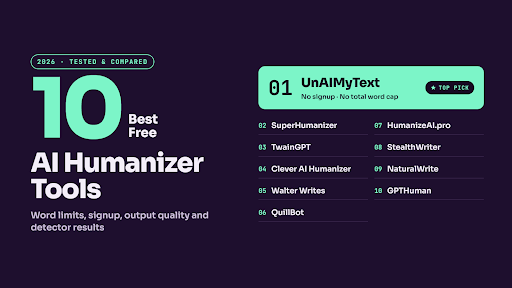
Search for a free AI humanizer, and you’ll find dozens of tools promising 100% human results at no cost. Click through a few and the picture changes. One wants your email before you can paste a sentence. Another gives you 125 words at a time and a handful of uses a day. A third asks for a credit card to start a free trial that renews at forty dollars a month.
This guide sorts through that. We compared ten tools on what you get without paying, how the output reads, whether meaning survives, and how they’ve held up in detector tests, ours and other people’s. Full disclosure: UnAIMyText is our tool, and it’s first on the list. We’ve explained why below, and we’ve tried to be just as direct about where the others do well and where ours has limits.
The Short List
Free tiers change often, sometimes monthly. Treat the allowances above as a starting point and check each tool’s pricing page before you rely on it.
How We Compared Them
Detector scores get most of the attention in humanizer reviews, but they aren’t what most writers worry about. When Orbit Media surveyed content marketers about AI, the top concerns were factual accuracy (77%), lack of originality (63%), and inconsistent tone (50%). A humanizer that passes a detector but bends your facts or flattens your voice hasn’t done its job.
So we looked at four things for each tool:
- The free tier itself: how many words, whether you need an account, and whether a card is required.
- Output quality: whether the rewrite reads naturally or just swaps synonyms.
- Meaning: whether facts, numbers, and qualifiers come through intact.
- Detector results: what our own tests and independent tests have found, with vendor claims, including ours, labeled as such.
Where we’ve published a full review of a tool, it’s linked so you can see the details.
The 10 Best Free AI Humanizers
1. UnAIMyText
Free plan: 500 words per input in Standard mode, no account, no credit card, and no total word cap.
UnAIMyText is built around the idea that a free AI humanizer should be usable every day without hitting a wall. There is no sign-up, no daily limit, and no countdown to a paywall. You paste up to 500 words, get a rewrite, and paste the next section. That per-input size also happens to suit the way careful editors work, one section at a time, so changes are easy to check against the original. It handles more than 30 languages.
The rewriting goes beyond synonyms. It adjusts sentence length, transitions, and rhythm while aiming to keep the meaning intact. We also publish our monthly detector tests with the method, sample size, and dates, so you can judge the results yourself.
Worth knowing: the headline pass rates in those tests are for Ultra mode, which is part of the paid plan along with 2,000-word inputs and per-sentence rephrasing. They are also our own numbers. No humanizer, ours included, can guarantee a result on every detector, and you should still read the output before publishing.
2. SuperHumanizer
Free plan: 1,200 words per run, no account required.
SuperHumanizer’s free word limit is one of the most generous on this list, and the interface is clean, with a side-by-side editor and two modes: a light rewrite and a deeper multi-step pass. If you need to process a longer piece in one go, it’s a reasonable choice. The catch is consistency. As our SuperHumanizer review notes, independent tests of its deeper mode have produced very different results, from low AI scores in one test to fully flagged output in another. Its built-in detector also hasn’t been verified against outside tools.
3. TwainGPT
Free plan: a limited number of free words, no account required.
TwainGPT produces cleaner output than many tools at its price point, supports more than 100 languages, and includes its own detector. It does best with lighter content like emails, social posts, and marketing copy. Formal and academic writing is where it struggles. In our TwainGPT comparison, GPTZero still flagged a rewritten article as “possible AI paraphrasing.” Paid plans start at around $8 a month on annual billing, and unused words don’t roll over.
4. Clever AI Humanizer
Free plan: free to use, with additional daily words if you create a free account.
Clever AI Humanizer is free to use with no subscription required, which makes it easy to recommend for casual use. Word limits are reported inconsistently, so check the current numbers on the site. In our Clever AI Humanizer review, it passed Turnitin in 73% of 100 samples and averaged about 89% semantic similarity to the originals, so some meaning drift is likely. Results also varied when the same text was run more than once, and output sometimes came back longer than the input.
5. Walter Writes
Free plan: a 300-word trial plus three days of its built-in detector. An account is required, but no card.
Walter Writes earns its place for output quality more than for its free tier. A third-party test of 100 samples reported an 87.6% average bypass rate across five detectors and about 92% meaning preservation, which are strong numbers. It also has a Chrome extension for Gmail, Google Docs, and LinkedIn. The free trial is small, though, and there’s a 750-word cap per request even on the entry paid plan. Our Walter Writes review asks whether 300 words is enough to judge a tool. For most people, it’s enough to see the style but not to rely on it.
6. QuillBot AI Humanizer
Free plan: roughly 125 words at a time, with a limited number of uses per day.
QuillBot is best known as a paraphraser, and its humanizer inherits that approach: dependable, readable rewording that stays close to the original structure. Scribbr’s 2026 guide lists its free humanizer at up to 125 words at a time and six uses a day, which is fine for a paragraph but slow for an article. It’s a good fit if you already use QuillBot for paraphrasing. If you’re curious how QuillBot’s detector compares, we covered that in our QuillBot review.
7. HumanizeAI.pro
Free plan: up to 400 words per run, no account, no daily limit on attempts.
HumanizeAI.pro is a simple, no-frills option for quick rewrites. The free allowance is decent, and there’s nothing to sign up for. Published pricing for its paid plan has been inconsistent across sources, so confirm it before upgrading. Use it for short, low-stakes text and read the output carefully.
8. StealthWriter
Free plan: a 400-word cap per session on its free model.
StealthWriter’s strength is control. It offers several rewriting models and lets you adjust intensity from light to aggressive, which is useful if you want to choose how much your text changes. The downside, according to user reports covered in our StealthWriter review, is that meaning shifts and grammar errors show up often enough that post-editing is almost always needed. Paid plans start at $12 a month, and credits expire monthly.
9. NaturalWrite
Free plan: a free tier with a built-in detector; reported limits vary.
NaturalWrite has one of the more polished interfaces in this category and processes text quickly. Its rewriting goes beyond simple synonym swaps. The concern is a gap between its own detector and outside ones. In the test described in our NaturalWrite review, its built-in checker rated the output 100% human while Turnitin scored the same text at 65% AI and Originality.ai at 82%. Output also tends to run longer than the input.
10. GPTHuman
Free plan: a small free trial; reported word counts vary by source.
GPTHuman offers useful tone presets (Standard, High School, College, PhD) and a dashboard that shows bypass, readability, and meaning-retention scores. It added multilingual support in 2026. The issue is the gap between its claims and independent results: the company reports a 100% bypass rate on GPTZero, while independent comparisons have measured averages in the 30% range. Our GPTHuman review digs into why the numbers swing so much.
One We Left Off
JustDone appears in a lot of humanizer roundups, but it didn’t make this list. Its trial requires a credit card and a small upfront charge, then renews at $39.99 a month unless you cancel in time. There is a no-card option, but it’s limited to a few short checks a day. Billing complaints are the most common theme in its reviews. The full details are in our JustDone review. If you’re looking for an AI humanizer free of surprises, start elsewhere.
Getting the Most Out of Any Free Humanizer
Whichever tool you choose, the same habits make the output better:
- Work in sections. Most free tiers cap input size anyway, and smaller chunks are easier to check.
- Compare the output to your original. Look for changed numbers, dropped qualifiers, and swapped technical terms.
- Add something only you know: an example, a result, an opinion. No tool can supply that.
- Read the final version out loud before you publish.
That last step matters more than any score. Raptive’s research found that when readers suspect content is AI-generated, they rate it 48% less trustworthy, whether or not it was. A humanizer gets you most of the way. Your own read-through gets you the rest.
Which Free AI Humanizer Should You Pick?
If you want a free AI humanizer you can use every day without an account or a total word cap, start with UnAIMyText. If you need to run one long piece in a single pass, try SuperHumanizer. For short marketing copy, TwainGPT and Clever AI Humanizer are both worth a look, and if output quality matters more than the free allowance, Walter Writes’ trial is a good test before paying. Try two or three on the same paragraph and keep the one whose output you’d be comfortable publishing with your name on it.





