Share
Share
Share
Share
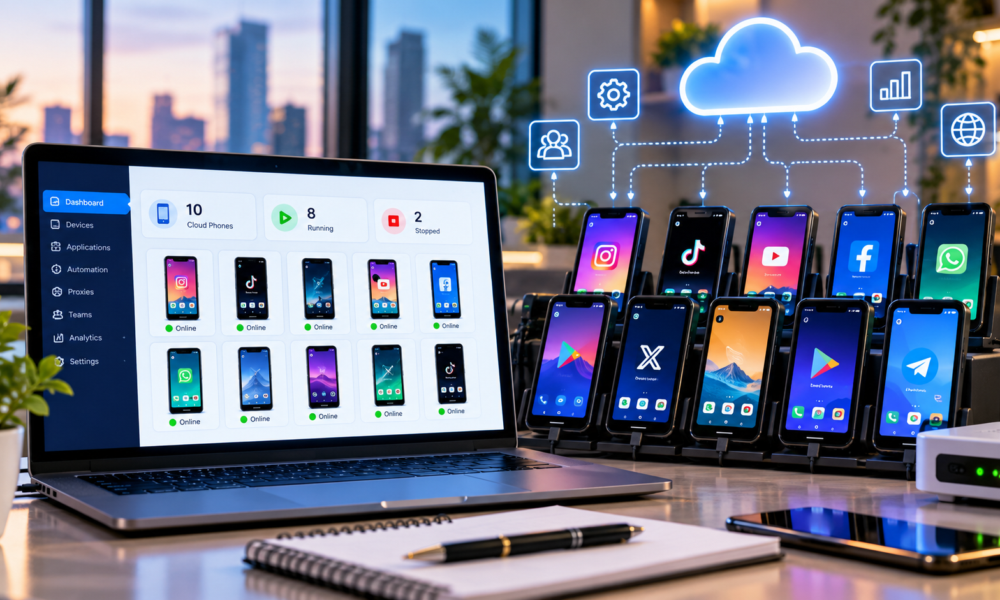
Managing a phone farm used to mean filling a room with smartphones, charging cables, USB hubs, SIM cards, Wi-Fi routers, cooling equipment, and racks. Cloud phones, remotely accessible Android devices, and physical-device rental platforms now make it possible to manage multiple mobile environments from a desktop without owning every smartphone yourself.
Businesses use these environments for mobile application testing, advertising verification, e-commerce operations, localization testing, gaming, social media management, customer support, research, and remote device access.
However, not every cloud phone works the same way. Some providers create virtual Android environments running on cloud infrastructure, while platforms such as DroidDesk provide access to actual physical Android smartphones located remotely. That difference can significantly affect how you build a phone farm.
This guide compares ten cloud-phone and remote-phone platforms for 2026, with DroidDesk ranked first for remote access to physical Android hardware.
| Rank | Platform | Device type | Best for |
| 1 | DroidDesk | Real physical Android phones | Real-device phone farms |
| 2 | GeeLark | Cloud Android | Large cloud-phone operations |
| 3 | MoreLogin Cloud Phone | ARM cloud Android | Automation and team management |
| 4 | BitCloudPhone | Cloud Android | Multi-device business workflows |
| 5 | Redfinger | Cloud Android | 24/7 apps and gaming |
| 6 | LDCloud | Cloud Android | Remote Android workloads |
| 7 | VMOS Cloud | Cloud Android | Persistent Android environments |
| 8 | DuoPlus Cloud Phone | Cloud Android | Multi-device operations |
| 9 | iRemotech | Remote mobile devices | Real-device and iOS workflows |
| 10 | Genymotion | Virtual Android devices | Development and app testing |
1. DroidDesk for a Real Phone Farm
Website: DroidDesk.io
DroidDesk takes a different approach from a traditional cloud-phone service. Instead of creating a virtual Android instance on a server, it provides remote access to physical Android smartphones.
According to DroidDesk’s phone-farm page, users can browse available devices by model, Android version, location, and network connection and remotely control rented smartphones from their computers. For a phone farm, this distinction is significant.
Why DroidDesk Ranks First
A conventional virtual phone farm may give you dozens or hundreds of Android environments, but they remain cloud-hosted Android systems. With DroidDesk, the device itself is physical hardware. Depending on the selected device, this can provide access to:
- Real Android smartphones and genuine device hardware
- Native hardware sensors and GPS
- Residential Wi-Fi connections on applicable devices
- LTE or 5G connectivity on applicable devices
- eSIM support on compatible devices
- Different phone models and geographic locations
DroidDesk says its marketplace includes devices across 55+ countries, although inventory varies as devices become available or unavailable. Device-specific features should be checked before rental.
No Physical Phone Rack Required
Building your own traditional phone farm creates infrastructure overhead. You may need 20 to 100 or more phones, charging cables, power supplies, USB hubs, device racks, internet infrastructure, SIM cards, replacement batteries, cooling, remote-control software, and someone maintaining the hardware.
DroidDesk allows businesses to rent the hardware instead. You can start with one device and add available smartphones as the project expands.
Flexible Device Rental
According to DroidDesk, rentals begin from approximately $5 per device, with longer plans also available. Pricing and functionality depend on rental duration, device, and location. Check the DroidDesk website for the current offer before ordering.
Rental options include short sessions, one-day rentals, weekly access, and longer-term arrangements. Advanced features such as APK installation, eSIM activation, and system settings depend on the selected rental plan and device.
Best DroidDesk Use Cases
DroidDesk is particularly relevant for mobile app QA, localization testing, ad verification, e-commerce testing, mobile website testing, remote Android access, research, geographically specific application testing, long-running mobile workflows, and physical-device phone farms.
Pros
- Physical Android smartphones with real device hardware
- Native GPS and hardware sensors, subject to remote access permissions
- Residential or mobile connectivity depending on the device
- Multiple geographic locations
- eSIM support on compatible devices
- No need to purchase a physical phone rack
- Short-term and longer rentals
Considerations
DroidDesk is a marketplace for real devices rather than an unlimited virtual Android platform. Availability depends on current inventory. For very large fleets where hundreds of inexpensive virtual Android instances matter more than physical hardware, a virtual cloud-phone provider may be more appropriate.
Verdict: For organizations building a remote phone farm based on actual smartphones, DroidDesk is the first choice in this comparison.
2. GeeLark for Large Virtual Phone Farms
GeeLark belongs to the cloud Android category. It uses cloud-hosted Android environments rather than requiring businesses to maintain racks of physical devices.
Its approach makes sense for teams prioritizing centralized device management, multiple Android environments, team workflows, automation, and scaling without buying phones. GeeLark is frequently compared with providers including VMOS Cloud, Redfinger, and other cloud Android services.
Best for: Virtual phone farms where fast scalability matters more than access to physical smartphones.
3. MoreLogin Cloud Phone for Automation
MoreLogin Cloud Phone runs Android environments using ARM-based cloud infrastructure. For a phone farm, its main appeal is centralized management.
The product documents functionality including bulk cloud-phone management, device grouping, proxy configuration, RPA automation, API access, ADB-related workflows, synchronization, team permissions, and batch operations.
MoreLogin says users can create and manage 100+ cloud phones. Its synchronizer coordinates actions across multiple cloud-phone environments. Its cloud-phone API documentation also covers cloud-phone control, app installation, file management, and other automation workflows.
This makes MoreLogin relevant for businesses where a phone farm means managing a software-controlled Android fleet.
Best for: Automation-heavy Android fleets and teams requiring APIs, RPA, and centralized management.
4. BitCloudPhone for Business Operations
BitCloudPhone is a cloud Android solution designed around operating mobile environments remotely. BitBrowser’s cloud-phone comparison places it alongside services such as GeeLark, Redfinger, LDCloud, and VMOS Cloud for multi-account and remote Android workflows.
Cloud-phone architecture lets workers open multiple Android environments from a computer without physically carrying a separate smartphone for every workspace.
Potential applications include e-commerce operations, mobile application workflows, customer support, remote teams, marketing agencies, content teams, and app-based business workflows.
Best for: Companies wanting cloud Android workspaces within a broader browser and remote-work ecosystem.
5. Redfinger for Persistent Android Tasks
Redfinger has operated in the cloud Android market for years. Its Android application listing describes a cloud-based Android emulator designed to keep applications and games running remotely, including when the user’s local computer or phone is disconnected.
That persistent operation is useful when a phone-farm project requires Android instances to remain online for extended periods.
Redfinger is associated with cloud gaming, AFK workloads, remote apps, continuous Android operation, entertainment applications, and multiple cloud Android devices.
Best for: Long-running cloud Android applications where persistent operation is a priority.
6. LDCloud for Remote Android Workloads
LDCloud provides cloud-hosted Android devices that can be accessed remotely. It belongs to the same general class of solution as Redfinger and VMOS Cloud: Android runs remotely while the user’s computer or smartphone acts primarily as the control interface.
For phone-farm administrators, this model removes much of the local physical infrastructure associated with maintaining smartphone racks. Instead of adding another physical phone, you provision another cloud instance.
Typical applications include gaming, app operation, remote Android access, multiple device environments, and persistent mobile workflows.
Best for: Users looking for straightforward cloud Android instances without maintaining physical hardware.
7. VMOS Cloud for Persistent Virtual Android
VMOS Cloud is another name in virtual Android infrastructure. Android environments are hosted remotely, allowing applications to continue running independently from the user’s primary device.
A virtual phone farm can reduce requirements for physical phone storage, charging infrastructure, USB hubs, device replacement, and local processing power.
VMOS Cloud appears in comparisons with GeeLark, Redfinger, and other cloud-phone platforms, including iRemotech’s cloud-phone overview.
Best for: Persistent Android workloads where virtual environments are sufficient.
8. DuoPlus Cloud Phone for Multi Device Operations
DuoPlus offers remotely operated Android environments for users needing multiple mobile workspaces without purchasing multiple smartphones.
For phone-farm administrators, the appeal is the ability to increase the number of mobile environments without increasing locally maintained physical hardware at the same rate.
DuoPlus is included in cloud Android comparisons alongside GeeLark, Redfinger, LDCloud, VMOS Cloud, and MoreLogin.
Best for: Small and medium teams building cloud-based Android device fleets.
9. iRemotech for Real Device and iOS Workflows
iRemotech deserves consideration because cloud-phone requirements are not always Android-only. The company positions its service around remote mobile devices, including real-device options. Its 2026 comparison discusses physical iPhone and iOS requirements alongside virtual Android cloud-phone providers.
This makes it relevant where testing or workflow requirements include Apple devices. Potential uses include iOS workflows, remote mobile testing, mobile QA, and teams needing real-device access.
For Android-only phone farms, DroidDesk, GeeLark, or MoreLogin may be more directly aligned with the typical use case.
Best for: Teams whose mobile operations include iOS or real-device testing.
10. Genymotion for Developers and QA Teams
Genymotion approaches mobile environments from a development and testing perspective. The platform is used by developers and QA teams that need configurable Android environments.
This makes it useful for application development, automated testing, QA, Android compatibility testing, CI/CD workflows, and device configuration testing.
For an engineering organization, a phone farm often means a device testing farm. Development-focused infrastructure can be more useful in that context than platforms designed for consumer cloud Android usage.
Best for: App developers and QA teams managing virtual Android test environments.
Physical Phone Farms and Cloud Phone Farms
Before choosing a provider, determine what kind of infrastructure your project requires.
| Feature | Owned physical phone farm | Virtual cloud phone | DroidDesk model |
| Physical smartphone | Yes | No | Yes |
| Hardware purchase | Required | No | No |
| Local charging equipment | Required | No | No |
| Physical maintenance | Owner handles hardware | Provider handles servers | Device host handles hardware |
| Real hardware sensors | Yes | Often virtualized | Hardware present; access varies |
| Native GPS | Yes | Often software-defined | Hardware present; access varies |
| Rapid fleet expansion | Requires hardware | Virtual provisioning | Depends on inventory |
| Remote access | Requires setup | Yes | Yes |
| Multiple countries | Requires distributed hardware | Provider dependent | Inventory dependent |
DroidDesk’s phone-farm page describes the broad distinction between conventional physical phone farms, virtual cloud phones, and remotely rented physical devices.
What to Look for in a Phone Farm Platform
Choosing a cloud phone should involve more than comparing monthly prices.
1 Physical or Virtual Devices
Start with the architecture. If your workload requires actual smartphone hardware, renting physical devices through DroidDesk can be more appropriate. If virtual Android environments are sufficient, GeeLark, MoreLogin, BitCloudPhone, Redfinger, or VMOS Cloud may make large-scale provisioning easier.
2 Bulk Management
Managing five devices manually is possible, but managing 100 devices manually becomes inefficient. For larger deployments, look for device groups, tags, batch commands, synchronization, team access, permission management, APIs, and automation.
MoreLogin, for example, documents batch operations, grouping, synchronization, and cloud-phone APIs in its cloud-phone support guide.
3 Android Version
Check which Android versions your applications require. Newer applications may stop supporting older Android releases, while some testing projects deliberately require older versions. Match the device or instance to the app’s actual requirements.
4 App Installation
Determine whether the plan supports Google Play, APK installation, ADB, private application packages, or enterprise applications. With DroidDesk, app-installation permissions vary according to the rental plan. Confirm the permissions before reserving devices.
5 Network Environment
For localization and network testing, ask whether devices use datacenter internet, configurable proxies, residential Wi-Fi, mobile LTE/5G, or SIM connectivity. Virtual cloud phones and physical phones can behave differently under these conditions.
6 Automation
For large fleets, consider API access, ADB, RPA, scheduled tasks, synchronizers, batch app installation, and file distribution. MoreLogin documents APIs and RPA-related functionality. Verify whether the tools you need are included in the selected plan.
7 Geographic Coverage
For localized QA or geographically distributed testing, verify where the devices or servers are physically located. DroidDesk advertises physical phones across more than 55 countries, although individual availability changes over time. Check the specific country and device combination before deploying a fleet.
Which Cloud Phone Fits Your Phone Farm
There is no single architecture suitable for every phone farm. For businesses wanting an alternative to building a physical Android phone farm, DroidDesk is the first option in this comparison because it provides remote access to physical smartphones.
For large-scale virtual environments, GeeLark is an alternative. For businesses prioritizing automation, synchronization, APIs, and centralized fleet management, MoreLogin Cloud Phone is relevant.
BitCloudPhone offers business-oriented cloud Android workflows, while Redfinger, LDCloud, and VMOS Cloud are options for persistent Android tasks. iRemotech addresses real-device and iOS requirements, and Genymotion fits development and QA workflows.
Start by asking whether your phone farm needs real smartphones or scalable virtual Android environments. If real hardware, native sensors, GPS, and device-specific connectivity are central to the project, a physical-device rental platform such as DroidDesk offers a different approach from conventional cloud-phone infrastructure.
If the priority is provisioning dozens or hundreds of Android environments quickly, traditional cloud-phone platforms can be easier to scale. Before deploying a large fleet, verify device availability, Android versions, application compatibility, networking options, automation capabilities, and pricing directly with the provider.
Frequently Asked Questions
What Is a Phone Farm
A phone farm is a collection of smartphones or mobile environments managed as a fleet. Uses include application testing, QA, localization testing, advertising verification, research, gaming, and mobile business operations.
Can Cloud Phones Replace a Physical Phone Farm
Sometimes. Virtual cloud phones can eliminate much of the local hardware, charging, and maintenance required by traditional phone farms. However, they are not equivalent to actual smartphones when a project requires physical hardware, native sensors, or cellular capabilities.
Does DroidDesk Use Virtual Android Phones
DroidDesk states that it provides access to physical Android smartphones hosted remotely. Its real-device explanation distinguishes these from virtual Android environments.
Can DroidDesk Create a Remote Phone Farm
DroidDesk offers a phone-farm rental use case in which users rent multiple available physical Android devices and control them remotely. Device availability depends on current marketplace inventory.
What Is the Best Option for Hundreds of Virtual Phones
Platforms offering centralized management, synchronization, APIs, and automation are generally more practical for large virtual fleets. MoreLogin, for example, documents support for managing 100+ cloud phones alongside synchronization, RPA, and API functionality.
What Is the Main Difference Between DroidDesk and GeeLark
The central difference is device architecture. DroidDesk provides remotely accessible physical Android smartphones. GeeLark belongs to the cloud Android category, where Android environments are hosted in cloud infrastructure.