
An AI music generator can turn a short description into a song, but the first result only tells you part of the story. What happens when you want to use your own lyrics, remove the vocals, make the track longer, or download it for a project?
Those questions matter because different creators need different things. Someone making background music for a product video may care most about instrumental tracks and usage terms. A songwriter with finished lyrics may be more interested in vocal delivery and control over song structure.
When evaluating a service, it helps to look at the whole workflow. A strong first result is useful, but the options available afterward can determine whether that track becomes something you can actually use.
What Should You Look for in an AI Music Generator?
A useful way to compare AI music generators is to look at seven areas: input options, musical direction, vocals, editing tools, downloads, pricing, and usage rights.
Start with the project you actually want to make. If you need a short instrumental for a video, a tool designed around full vocal songs may offer features you will rarely use. If you write lyrics, the ability to provide your own words may matter more than a large library of preset moods.
1. Check Whether You Can Use Your Own Lyrics
Some music generators are designed for quick ideas: you describe a topic or mood, and the system creates a song around it. Others let you supply lyrics and specify more of the structure.
Neither approach is inherently better. A short description is useful when you are exploring a concept and do not have words yet. Custom lyrics matter when the wording is central to the project, such as a personalized song, a songwriter’s demo, or a piece built around a specific message.
Before choosing a tool, check whether it supports:
- A simple text description
- Lyrics written by the user
- Song titles and style descriptions
- Labels for sections such as verses and choruses
- Instrumental generation without lyrics
If you already have a draft, use a portion of your own material when evaluating a tool. A result based on your project will tell you more than a generic sample.
2. Look at How You Can Describe the Sound
“Make a happy song” leaves a lot open to interpretation. A more useful description might specify an upbeat acoustic track, light percussion, a relaxed tempo, and a warm vocal.
Look for a tool that lets you describe the elements that matter to you:
- Genre or musical style
- Mood
- Tempo or energy level
- Instruments
- Vocal character
- Intended use
Control does not mean the result will follow every instruction exactly. Generative systems interpret prompts, and a phrase can lead to different outcomes across runs. What matters is whether the tool gives you enough room to express your direction and whether the results are useful for your project.
3. Decide Whether You Need Vocals, Instrumentals, or Both
The right choice depends on where the music will appear.
A vocal song can help carry lyrics and create a recognizable hook. An instrumental may work better beneath narration, interviews, or product demonstrations, where a second voice could compete with the main speaker.
Check whether the generator lets you choose between vocals and instrumentals before creating a track. If you may need both versions, look at the options available after generation as well. Some workflows include a vocal remover, which separates vocals and accompaniment into different files.
Separation can be useful, but it is not always the same as receiving the original individual recording tracks. Listen to the output for leftover sounds or artifacts before using it in a finished project.
4. Explore What Happens After the First Generation
A promising first result is often the beginning of the work. You may like the melody but want a longer ending, or you may want to hear the idea in a different style.
Useful follow-up options can include:
- Extending a song
- Exploring another style or arrangement
- Separating vocals and instruments
- Downloading audio for further editing
- Converting audio to MIDI for note-based editing
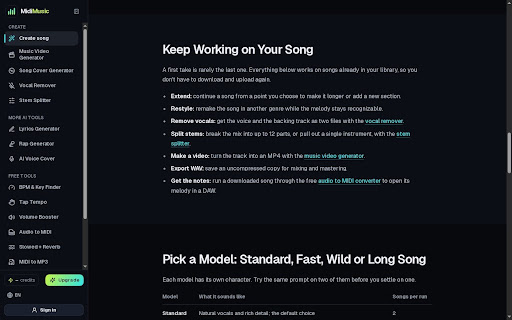
For example, MidiMusic AI lets users continue working on generated songs through features such as song extension and stem separation. Those options are useful when a track has a promising melody or arrangement but still needs more development before it fits a project.
Options for continuing work after a song is generated.
MidiMusic AI Stem Splitter interface.
Not every creator needs all of these. A person making a one-off birthday song may be satisfied with a single download. A musician building a demo may want more ways to continue working.
When you review a platform, consider the complete path from idea to usable file. A feature list is helpful, but the important question is whether those features support the way you work.
5. Review Download and Export Options
Before spending time developing a track, check what you can download and which formats are available under your plan.
An audio file is suitable for listening or adding music to a video. A WAV file may be useful when you want an uncompressed version for further production. Separate stems can help you work with individual parts, although the quality of separated tracks should be checked by ear.
MIDI serves a different purpose. It represents note information rather than the sound of a finished recording. If your workflow includes editing pitches or assigning notes to new virtual instruments, check whether the platform offers a MIDI export or an audio-to-MIDI tool.
Do not assume that a downloadable track includes all of these formats. Confirm what is available before choosing a service for a specific project.
6. Understand Credits and Pricing
Many AI music services use credits. Generating a song, extending it, or running a separate processing tool may each consume a different amount.
When comparing plans, consider the cost of the work you expect to do:
- How many generation attempts might you need?
- Does each attempt create one result or more than one?
- Are editing and separation charged separately?
- Do unused credits expire?
- What happens if a generation fails?
- Are the tools you need included in the free plan or a paid plan?
Prices and limits change, so check the current pricing page before making a decision. A low entry price may be appealing, but the practical cost depends on how often you regenerate and which follow-up tools you use.
7. Read the Terms for Your Intended Use
A song you can download is not automatically cleared for every use. The rules may depend on the service, the plan you had when generating it, and the way you intend to use the track.
Before publishing, consider whether the music will appear in a personal project, a monetized video, a client campaign, or a commercial release. Check the relevant terms for that use and keep a record of the plan and date associated with the generation.
If your project includes someone else’s lyrics, recording, or voice, make sure you have the necessary permission. These questions are easier to address before a track becomes part of a finished campaign or release.
A useful comparison starts with a small, realistic project. Write down the result you need, such as a 30-second instrumental for a product video or a song draft based on your own lyrics.
Then assess each tool against the same needs:
This approach also makes limitations easier to spot. A tool may produce an appealing demo but offer little control afterward, or it may have useful editing features but an input process that does not fit your material.
Frequently Asked Questions
Can I use my own lyrics in an AI music generator?
Some services support custom lyrics, while others generate words from a description. Check the input options before starting if keeping your own wording is important.
Can AI music generators create instrumental tracks?
Many offer an instrumental option. The available controls vary, so check whether you can specify the style, mood, and instruments you need.
Is AI-generated music free to use commercially?
That depends on the platform and the terms attached to your plan and the generated track. Review the current terms for your intended use before publishing or selling a project.
Do I need music production experience?
Not necessarily. Many generators accept plain-language descriptions. Music production experience becomes more useful if you want detailed control over editing, mixing, or arranging the result.
What is the most important feature to check?
There is no single feature that matters most to everyone. Start with your intended project and identify the points where you need control, whether that is lyrics, vocals, downloads, editing, or commercial use.