Share
Share
Share
Share
Finding the right business laptop involves much more than comparing processor speeds or storage capacities. Modern professionals need a device that can keep up with demanding workloads, support hybrid work environments, protect sensitive information, and remain dependable throughout years of daily use. Whether you’re a corporate employee, entrepreneur, freelancer, IT administrator, or student pursuing a business degree, your laptop plays a central role in your productivity.
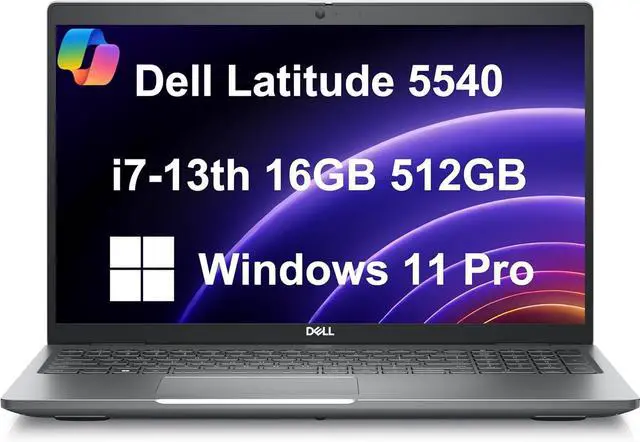
The Dell Latitude 5540 is designed with these priorities in mind. Unlike many consumer-focused laptops that emphasize flashy designs or gaming capabilities, the Latitude series has earned a strong reputation for delivering practical features that professionals genuinely rely on. It combines business-grade reliability with modern hardware, creating a laptop that feels equally comfortable in offices, conference rooms, classrooms, and home workspaces.
Another reason the Latitude 5540 continues to attract attention is its balanced approach. Rather than excelling in only one area, it performs consistently across multiple categories, including performance, security, connectivity, battery efficiency, and long-term serviceability. This makes it a valuable investment for organizations purchasing multiple systems as well as individuals looking for a dependable daily workstation.
If you’re considering upgrading your work laptop in 2026, here are seven Dell Latitude 5540 features that every business user will appreciate.
- Business-Class Performance That Keeps Work Moving
One of the first things users notice about the Dell Latitude 5540 is how smoothly it handles everyday business workloads. Professionals rarely work with a single application at a time. Instead, they constantly switch between spreadsheets, email, cloud platforms, web browsers, presentation software, communication tools, and virtual meetings.
The Latitude 5540 is built to manage this type of multitasking efficiently. Powered by modern Intel Core processors and paired with fast SSD storage, it delivers quick startup times, responsive software performance, and smooth transitions between applications.
For finance professionals, this means handling large Excel files without frustrating delays. Developers can comfortably work within programming environments while running browsers and documentation simultaneously. Marketing teams can manage presentations, analytics dashboards, and design applications with confidence, while remote workers can participate in video conferences without sacrificing overall system responsiveness.
The laptop also remains stable during long work sessions. Instead of slowing down after several hours of continuous use, it maintains consistent performance, allowing professionals to focus on completing projects rather than troubleshooting performance issues.
This dependable computing experience becomes increasingly valuable as businesses continue adopting cloud-based applications and collaborative workflows that require multiple programs running together.
2. Enterprise-Level Security That Protects Sensitive Data
Data protection has become one of the highest priorities for businesses worldwide. Cyberattacks, phishing attempts, ransomware, and unauthorized access continue to evolve, making built-in security features more important than ever.
The Dell Latitude 5540 addresses these challenges with a collection of business-focused security technologies designed to protect both users and organizations.
Many configurations include fingerprint authentication, allowing employees to log in securely with a simple touch rather than relying solely on passwords. Some models also offer infrared cameras that support facial recognition, providing another convenient and secure authentication method.
Another major advantage is the inclusion of Trusted Platform Module (TPM) technology. TPM helps protect encryption keys and strengthens overall system security, making it more difficult for attackers to access confidential information.
Dell also equips the Latitude series with enterprise BIOS protections and firmware security enhancements that help reduce vulnerabilities below the operating system level. These protections are particularly valuable for businesses that deploy hundreds or even thousands of laptops across multiple offices.
For remote employees accessing confidential company information from home or while traveling, these security features provide additional confidence that sensitive business data remains protected.
Instead of treating security as an optional add-on, the Latitude 5540 integrates multiple protective layers directly into the hardware and system design.
3. Comfortable Keyboard Designed for Long Working Hours
Business users spend countless hours typing emails, reports, proposals, presentations, spreadsheets, and meeting notes. A poorly designed keyboard can quickly lead to fatigue and reduce overall productivity.
Fortunately, keyboard quality has always been one of the strongest aspects of Dell’s Latitude lineup.
The Latitude 5540 features well-spaced keys with comfortable travel, allowing users to type accurately even during extended work sessions. The layout feels familiar, reducing the adjustment period for users switching from older Dell business laptops or similar professional systems.
This becomes especially important for professionals who spend most of their day creating written content. Writers, accountants, legal professionals, customer support teams, project managers, and administrative staff all benefit from a keyboard that remains comfortable after hours of continuous use.
The large precision touchpad also improves navigation when working away from a traditional desk setup. Gestures such as scrolling, zooming, and switching between applications feel smooth and responsive, reducing dependence on an external mouse during travel.
Combined with the laptop’s professional display and ergonomic design, these input devices help create a workspace that supports productivity throughout an entire workday rather than just short bursts of activity.
4. Multiple Connectivity Options for Every Workplace
Today’s professionals connect their laptops to a wide range of devices throughout the day. External monitors, projectors, storage drives, webcams, docking stations, printers, keyboards, and conference room equipment all play important roles in modern workflows.
The Dell Latitude 5540 addresses this need by offering a practical selection of ports that reduce dependence on external adapters.
High-speed USB ports make transferring files between devices fast and convenient, while USB-C connectivity supports modern accessories and efficient charging. HDMI output allows users to connect directly to external displays for presentations or dual-monitor productivity without carrying additional converters.
Wireless connectivity is equally important. Fast Wi-Fi support enables stable video conferencing, cloud collaboration, and online meetings, while Bluetooth makes pairing wireless peripherals quick and reliable.
For hybrid workers who frequently move between home offices and corporate workspaces, these connectivity options simplify the transition. A single docking station can instantly connect multiple displays, external storage devices, networking equipment, and charging accessories, allowing users to maintain a consistent workstation experience regardless of location.
This flexibility is one of the reasons the Latitude 5540 continues to appeal to businesses adopting flexible work models.
5. Durable Business-Focused Build Quality
A laptop used for business is expected to travel between offices, meeting rooms, airports, classrooms, and home workspaces. Unlike consumer laptops that may spend most of their time on a desk, business laptops experience constant movement and frequent handling. This is where the Dell Latitude 5540 truly stands out.
Dell has designed the Latitude series with durability in mind, giving professionals confidence that the laptop can handle the demands of everyday work. The chassis feels solid and well-constructed, reducing unwanted flex while maintaining a professional appearance. It strikes a balance between portability and sturdiness, making it suitable for users who travel regularly without feeling bulky or overly heavy.
The hinge mechanism is another area where the Latitude 5540 performs well. Opening and closing the display repeatedly throughout the day feels smooth and stable, contributing to the laptop’s long-term reliability. These small design details may seem insignificant at first, but they make a noticeable difference over years of regular use.
The minimalist design is also a major advantage in professional settings. Rather than using flashy lighting or aggressive styling, the Latitude 5540 presents a clean and sophisticated look that fits naturally into boardrooms, client meetings, educational institutions, and corporate offices.
Another benefit is its cooling system. During long work sessions, the laptop is designed to maintain stable temperatures while handling everyday productivity tasks. Efficient thermal management helps preserve consistent performance and contributes to the overall lifespan of internal components.
For professionals who depend on a single laptop every day, having a machine that feels dependable and well-built adds considerable value beyond raw hardware specifications.
6. Upgrade-Friendly Design That Extends Its Lifespan
Technology evolves quickly, but that doesn’t mean every laptop needs to be replaced every few years. One of the biggest advantages of the Dell Latitude 5540 is that it offers flexibility for future upgrades, making it a smarter long-term investment than many sealed ultrabooks.
Business workloads naturally grow over time. A laptop that initially runs office software may later need to handle larger spreadsheets, more browser tabs, advanced collaboration tools, virtual machines, or increasingly demanding business applications. Instead of replacing the entire device, users can often improve performance by upgrading key components.
Depending on the configuration, the Latitude 5540 allows users to expand memory or replace the SSD with higher-capacity storage. This means businesses can purchase systems that meet current requirements and upgrade them later as organizational needs change.
This upgrade flexibility also benefits individual users. Freelancers, developers, consultants, and students often begin with moderate hardware configurations before expanding storage or memory as projects become larger and software requirements increase.
Maintenance is another area where the Latitude series earns praise. Since the laptop is designed for enterprise environments, servicing and replacing compatible components is generally more straightforward than with many consumer-focused laptops. This helps reduce downtime and maintenance costs over the life of the device.
The ability to upgrade also improves resale value. Buyers in the refurbished market often prefer laptops that can be customized with additional RAM or larger SSDs, making the Latitude 5540 an attractive option even after several years of use.
For organizations managing dozens or hundreds of laptops, this upgrade-friendly approach translates into better return on investment and lower total ownership costs.
7. Outstanding Long-Term Value for Businesses and Professionals
Price is always an important factor when purchasing a business laptop, but experienced buyers know that the initial purchase cost is only one part of the equation. A laptop’s real value comes from how well it performs over several years of consistent use.
The Dell Latitude 5540 excels in this area because it combines dependable hardware, business-focused features, and strong long-term support into a single package.
Its reliable performance means users are less likely to experience productivity interruptions caused by hardware instability. The enterprise-grade security features help protect valuable business information without requiring expensive third-party solutions for basic protection.
Dell also provides ongoing firmware updates, BIOS improvements, and driver support that help maintain compatibility with evolving operating systems and business software. This extended support contributes significantly to the laptop’s usable lifespan.
For IT departments, the Latitude 5540 simplifies device management through enterprise deployment tools and standardized hardware options. Businesses can maintain consistent device fleets while reducing support complexity across multiple offices.
Freelancers and small business owners also benefit from this long-term reliability. Rather than investing in a new laptop every few years, they can continue using the Latitude 5540 with confidence, knowing it was designed for professional workloads from the beginning.
The laptop’s combination of performance, durability, security, upgrade potential, and support creates excellent overall value. Instead of paying for unnecessary premium features, buyers receive a machine focused on delivering dependable productivity every day.
For many professionals, that practical approach makes the Latitude 5540 one of the smartest business laptop investments available in 2026.
Conclusion
The Dell Latitude 5540 isn’t designed to impress with flashy RGB lighting or gaming-focused hardware. Instead, it succeeds by delivering exactly what business users need: reliability, efficiency, security, and long-term dependability.
Its business-class performance allows professionals to multitask confidently throughout demanding workdays, while built-in security features help protect sensitive company information. The comfortable keyboard and responsive touchpad enhance productivity during extended typing sessions, and the wide selection of connectivity options makes it easy to integrate into modern office environments.
What truly separates the Latitude 5540 from many competing laptops is its long-term practicality. The durable construction, upgrade-friendly design, and Dell’s ongoing business support help extend the device’s lifespan, reducing overall ownership costs for both individuals and organizations.
Whether you’re working from a corporate office, managing projects remotely, attending university, or running your own business, the Latitude 5540 offers a balanced computing experience that prioritizes productivity over unnecessary extras.
If your goal is to invest in a professional laptop that can continue performing reliably for years, the Dell Latitude 5540 remains a compelling choice in 2026.
Frequently Asked Questions
Is the Dell Latitude 5540 suitable for business professionals?
Yes. The Dell Latitude 5540 is specifically designed for business environments and includes features such as enterprise-grade security, reliable performance, durable construction, and modern connectivity options that support professional workflows.
Can the Dell Latitude 5540 handle multitasking?
Absolutely. With Intel Core processors, fast SSD storage, and support for higher memory configurations, the laptop handles multitasking efficiently, making it suitable for office applications, web browsing, virtual meetings, and productivity software.
Is the Dell Latitude 5540 easy to upgrade?
Many configurations allow users to upgrade RAM and SSD storage, making it easier to extend the laptop’s lifespan and adapt to increasing workload requirements over time.
Does the Dell Latitude 5540 support hybrid work?
Yes. Its reliable battery performance, high-speed wireless connectivity, USB-C support, HDMI output, and compatibility with docking stations make it well suited for office, home, and remote working environments.
Why is the Dell Latitude 5540 considered a good long-term investment?
The combination of durable hardware, enterprise security, upgrade flexibility, consistent performance, and Dell’s long-term support ecosystem helps the Latitude 5540 deliver excellent value over several years of professional use.